Saturday, November 10, 2012

Balancing Starcraft II - Making an E-Sport

It's no big secret that I'm a big Starcraft II fan. Apart from Portal and the odd session of Angry Birds it's the only video game I play. For those not in the know, Starcraft II is a real time strategy game. Think of it as competitive SimCity building but with marines. The best way to play Starcraft II is over the network with friends  However, it's really hard to design a real time strategy game that's balanced and fun. In fact it's taken Blizzard 5 tries to get up to this point.

Warcraft-logo.gif

Blizzard's first attempt was the original Warcraft way back in 1994. It featured two races; orcs and humans. You can play either side and each side had different units and abilities. Well, by "different" I mean mostly different graphics. The actual abilities between the two sides were really quite similar. The game units were also of vastly different abilities meaning that games always degenerated into a rush to some big unit and then produce as many as possible. It was a fun game but a bit simplistic.
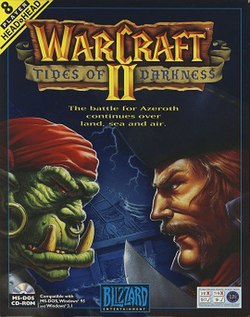
Warcraft-2-Tides-Of-Darkness-Pc.jpg

Blizzard's next attempt was Warcraft II: Tides of Darkness. This game was also a huge amount of fun. In all the inital head-to-head games I played it felt really balanced. Unfortunately there was this unbalancing orc spell called blood-lust that would allow you to obliterate your human opponent. In the end, my friends and I reverted to simply playing against the computer on custom maps - which was also an insane amount of fun.

The box art of StarCraft

The original Starcraft was a big win for head to head play. The expansion pack called "Brood war" was even better. This was the game that created the e-sport phenomenon in South Korea. Not only were all 3 sides (!) balanced but the game had depth to it. You could play forever and keep getting better. There were two big problems though. Finding a person to play against online was hit and miss. Because there was so much depth you'd either play against someone who was clearly better or against someone who was clearly worse. There was also the problem that the super balanced head to head play meant that playing against a real person was very, very intense. So intense, in fact, that we often just played against the computer. That could be intense but not to the point where you had to take a break after each game :-O.

WarcraftIII.jpg

Warcraft III came next and it was a serious attempt to create good head to head playing experience. The biggest improvement over Starcraft was the opponent matching system. The system would keep track of who won against who and try to automatically match you with someone of your skill level.

Warcraft III was also less intense than Starcraft. Warcraft III was built so you focused more on managing your troops and less on building an maintain you bases. It focused on the generaling more and less on the SimCity building aspect. Blizzard's idea was that the troop control was the fun part and base building a distraction. It isn't. The real fun in Starcraft, and the earlier games, was managing both the SimCity aspect and the troops at the same time! To be honest it's actually more multi dimensional. You can have to balance your technology and upgrade, with the quantity and composition of your army, while balancing troop production with how quickly your mineral production expands and then balancing that with how many troop production building an of what type you want to build. Oh, yes and on top of that you have to be the general in the field and tell your troops what to do.

StarCraft II - Box Art.jpg

Thanks to the enormous success of Stacraft and its use in e-sports, Blizzard, for the first time, made a game that was focused primarily on making that experience awesome. They also took the opponent-matching ladder system from Warcraft III, made a huge number of improvements and stuck it into Starcraft II. The whole package is a work of art.

So that brings me to the point of this post. I have recently come across a talk by one of the people involved with designing the Starcraft II online gaming experience. In this talk he relates how difficult it was to build a game that will work as an eSport while looking good and being fun to play for multiple levels of players. I found it fascinating.

Thursday, November 8, 2012

Light vs heavy mutex

I discovered a nice post at Preshing on Programming that discusses Light vs Heavy Mutexes. Mutexes are what allow you to do critical sections which, in turn, allow you to create programs that run on multiple processors. That got me thinking about how Java's "synchronize" keyword is implemented. Using Synchronized is the default way of creating critical sections. It used to be really slow but has gotten much, much faster recently. Apparently, synchronize is implemented using a combination of light and heavy locks as well as other techniques that make it even lighter than a light mutex.


Given that so much work has been done on it, I've still had performance issues with it. Using things like AtomicInteger with its check and set is still much faster.. Assuming that you can use it (it's not always possible.).

Thursday, June 7, 2012

2012 Student Protests Tuition Fee Graphs

It's summer in Montreal and I'm surrounded by student protests. It's impressive how the issue of university tuition costs has divided the city.

The students are protesting the Government's plan to increase tuition by 325$ a year until 2017. Here's a graph of the historical tuition costs in Quebec. Included are the inflation adjusted tuition costs in 2012 dollars. You can see that if the government plan goes through Quebec well see the highest tuition costs in over 40 years. That's probably what's got the students upset.

Click to zoom in


Inflation adjusted values calculated using the Bank of Canada's inflation calculator:
http://www.bankofcanada.ca/rates/related/inflation-calculator/

Projected inflation is 2% per year from 2013 - 2017.

Historical tuition fees taken from here:
http://www.globalnews.ca/quebec+tuition+fee+timeline/6442619736/story.html

Wednesday, January 18, 2012

Firefox and Version Numbering

I wrote this post about a year ago, left it in my drafts folder and forgot about it. I'm not sure why. It's quite good. The timestamp in my drafts folder says: 2/20/11.

Mozilla, the makers of the Firefox web browser, want to release four versions per year. I find it funny that most of the discussion about this in the arstechnica comments is about what the version numbers should be. As if this is the most important aspect of the decision.

Software development revolves around releases. A release is a software version that is available for purchase or download (ie: released to the public). Software manufacturers will then add new features to this old software and release a new version later. A software version number tells you which release of the software you are using.

By convention, the first release is called 1.0. The next major release is called 2.0. If there's been only bug fixes the version would be something like 1.0.1. If they're fixing bugs and introducing a few minor features the release might be 1.1. If they're introducing lots of minor features they might skip a few numbers and go straight to 1.5. The result of all this is you can use the version number to make an educated guess as to how much has changed in the new version.

All this version numbering is based on the assumption that you actually have major releases and minor releases. Some software is developed continuously and released on a fixed schedule. Every four months or so there might be a new release which contains whatever is finished at the time. Some releases might have only have bug fixes but others may have major new features. If you try and fit this into a typical version number scheme it becomes difficult to decide which release get a new major version number and which require a minor version number change.

Google's chrome Web browser is a good example of software development on a schedule. They have effectively abandoned major and minor version numbers. Google increments the major version number by one for (almost) every release irrespective of what new stuff it contains. We used a similar approach when we were developing Myster. Releasing on a schedule is a natural fit for the development team but can confuse those who expect a more traditional numbering scheme. It's confusing because the version number seems to lie; there's not always major new features despite the major version number change!

Mozilla has said they will be putting Firefox on a scheduled release system with four releases per year. Up until now Firefox has been using the more traditional release schedule and version numbering scheme. The new release schedule basically mandates that the major version number is incremented by one. Simply increasing the major version number by one with each release is so much easier than having quarterly arguments as to what the version number should be based on what happens to be in that particular release.

In these days of automatic updates, version numbers are practically irrelevant. What matters is whether you're up to date or not. I would like Mozilla to downplay Firefox's version number if they are releasing on a schedule. If they focus the conversation on the capabilities of the software and less on what it's version number is most other concerns will fall into the background as people adapt to the new reality.

Me from the present says: I'm using Firefox 9 and feelin' fine.

Sunday, January 8, 2012

Amdahl's Law and Critical Sections

Many moons ago I wrote a blog post on critical sections and efficiency. The blog post was a discussion of Amdahl's law. Aater Suleman over at future chips pointed out that Amdahl's law doesn't model critical sections. I used the wrong mathematical model! Oops.

Well, the good news is that my main point about critical sections hurting performance when you scale up to multiple processors is still valid... but all my graphs are wrong. *heavy sigh*. Since posting those graphs, I've been trying to find a moment to write a follow-up posting. What really drove home the importance of this was I noticed that just about every concurrency related session I attended at Java One this year mentioned Amdahl's law in relation to critical sections. Doh! It looks like I am in good company about miss-applying the law.

Amdahl's law applies to systems that can be split up into multiple tasks. Each one of these tasks is dependent on the completion of the previous task. Some of these tasks are 100% parallelizable others are not.
If we took this system and ran it on a machine with 3 processors, the amount of time it would take would be the amount of time for part 1 plus the amount of time for part 2 divided by the three processors:

In this example, on a single processor system, part 2 is three times longer to compute than part 1. So if we had three processors part 2 will run 3 times faster. Part 1 would stay the same speed because it can't be parallelized. The net result is we spend half of our time in part 1 and half of our time in part 2. It also means that overall, with 3 CPUs, this task will take half the time it would if we ran it on one CPU.

A real world example of this sort of situation would be painting a house. The first step would be going to get the paint from the store. It doesn't matter how many people you have it always takes the same amount of time to get the paint. The second step would be painting the house. Painting the house is something that can be split up amongst many people and so is parallelizable. The key thing here is you still need to wait until you have the paint before painting can begin and driving out to get the paint doesn't benefit from multiple people and so is not parallelizable.

Critical sections, on the other hand, are parts of a program that can only have one thread executing them at a time. A real world example would be having your friends help you move. Having multiple people can speed up moving house by every person carrying a different box out to the moving van. The thing is, two or more people can't fit through the front door at the same time. The door acts like a critical section; only allowing one thread (or person) to use it at a time.

This task contains a tiny piece that can't be done by multiple processes at the same time. In this example that same task will be executed 3 times on three different processors:


In the diagram the tasks on CPU2 and 3 started a bit late for some unimportant reason. However, when the process running on CPU 2 gets to the critical section it doesn't need to wait because CPU 1 is already finished with the critical section. Unfortunately, the processor running on CPU 3 does have to wait for CPU 2 to finish using the critical section. That's bad luck for process running on CPU3.

Critical sections are different from the situation described by Amdalh's law because the system might run completely in parallel; two processes that wait for each other is an unlucky occurrence. This means that, for a single run, we have no idea how much time the program will take because it depends on how often two or more threads both hit the same critical section.

While searching for Amdahl's law and critical sections I found a paper that provided a mathematical model for critical sections. Stijn Eyerman, one of the co-authors of that paper, created an web page that generates the kind of graphs (factor speedup vs number of cores for critical sections) I give below. The only downside is that the page is completely unfathomable unless you've read the paper. The paper is no picnic either. So what do the graphs look like when I use the right mathematical model?

Below is a graph of the factor speedup vs number of cores. This is is for critical sections:


Notice how the impact of the critical section is small up until the point when it suddenly starts to drastically limited the amount of speedup. Conceptually speaking this is the point where there's almost always a thread in the critical section... Or as the paper puts it the execution time "is determined by the serialized execution of all the contending critical sections".

For comparison, this is the graph for Amdalh's law:


In contrast to critical sections, the system starts to show inefficiencies much sooner but degrades much more gradually.

Here's the same data as above but in terms of % efficiency as the number of cores increase. First critical sections:


Now for Amdahl's law:

Here's what the graphs looks like for up to 100 cores. First critical sections:


Now for Amdahl's law:


Here's a direct comparison between Amdalh's law and critical sections at 95% parallelizable up to 100%. The red line represents critical sections.


(If you're using the Modeling critical sections in Amdahl's law web page the parameters I'm using are sequential code: 0 and Contention Probability: 1 )

Well, I hope this has been educational.

Wednesday, June 22, 2011

Critical Sections and Efficiency


Oops, I made an error when I wrote this post. The mathematical formula I'm using to make all them pretty graphs doesn't actually apply to critical sections.

Here's a followup posting with the correct graphs for critical sections!

It only applies to code that must run in parallel then must run sequentially. One step must finish completely before the other can begin. In our moving example below it would be like step 1 would be moving the furniture into the van (highly parallelizable), the second part would be driving the single van to the new location and step 3 would be moving the furniture into the new house. Steps 1 and 3 are parallel and step 2 is sequential (only one van and one driver. Everyone has nothing is just riding along in the van or their own cars or something. Maybe they teleported.) So in conclusion I'm trying to understand the math for critical sections and I'll write something on that later.

Modern computers tend to have more than one processor core. Each one of those processor cores is like an individual computer brain. This has led to something of a crisis in computing circles because figuring out how to make use of those two cores is hard. A big chunk of the problem is splitting up a computing task into pieces that can be done independently. For example, moving house is easy to parallelize because every person who shows up to help can grab a different box. Walking through doors is harder to paralyze because if all your moving buddies walked through the same door at the same time they're going to bump into each other. That would be funny be not very productive.

In the computer world, whenever you parallelize a task you end up with a bit of that task that must be done sequentially (one at a time). If people are helping you move they can each move a box but they can't go through the door at the same time. In the computing world things like doors are called a critical sections. A critical section is a piece of a task that cannot be done in parallel.

Ever since working on a project to improving the performance of InteleViewer's image decompression on multiple processor machines I've been wondering how critical sections affect performance. InteleViewer will often open a stack of something like 500 images and each image will need to be decompressed before it can be displayed. This is an easy task to split up since you can just give each core a different image to compress. The thing is, there's a very tiny amount of task co-ordination that needs to be done in a critical section. When we ran the code on a two core computer we notices that the cores were only being used at 98% efficiency.

First of all, that's an incredible loss in efficiency given that the critical section was doing practically nothing and secondly, how much will the CPUs be idle on computers with something like 12 or 16 cores? In our moving day analogy it's roughly analogous to wondering how many much time will be wasted while people wait for each other to walk through the door if a large number of people are helping you move.


Luckily I recently stumbled across Amdahl's law. Amdahls's law isn't a new courtroom drama series premiering this fall on Friday nights at 8pm (9 central). It's a mathematical model that deals with the efficiency of parallel task running the presence of critical sections. I took the formula and produced a graph to see what was going on.

This chart has the number of cores along the X axis and the factor speedup along the Y axis. The lines represent how much of the task can run in parallel. The blue line represents the ideal of a task where 100% of it can run in parallel. The orange line represents a task where 99% of it can run in parallel and the light blue line at the bottom represents a task where only 50% of it can run in parallel.

(To go back to our moving analogy, the orange line is a house with a door and the light blue line is a house with a door and a very long, narrow hallway that you have to pass through first. The dark blue line is a house with no door.. which would be kinda weird in real life but perfectly safe in a world populated only by math.)


(Click to enlarge, higher is faster)

Notice how the light blue line at the bottom never quite reaches the 2X speed up even when you put up to 16 cores on the problem.

I found it surprising how inefficient things get even when 90% of the task is able to run in parallel. At around six cores there's almost no point in adding more cores. They don't really speed up things that much.

I also have a graph of the % efficiency. This grap htells you how busy each processor core would be if you gave it a some task and some number of cores.


(Click to enlarge)


Here's what the graph looks like up to 100 processors:

(Click to enlarge)

Notice how even a task that runs in parallel 99% of the time only makes use of half the available computing power at 100 CPUs. We don't have computers with 100 cores yet but with the number of cores on a processor doubling every 18 months or so we could have that in less than ten years. The main problem is that the InteleViewer's image decompression example represents close to a best case scenario and even there we have code that's not going to scale up to that many cores. Making programs run efficiently on multiple processor cores is hard. It's all just a tad depressing.

The people who make processors have noticed this problem too. In the latest batch of chips they are opting to not add more cores but instead to put a video processor (GPU) and other task specific hardware on the processor die... but that's another blog post.

The InteleViewer example actually does have a happy ending. We decided to switch from using critical sections to using a magical technique called compare-and-swap. It's not always possible or wise to use this technique but for InteleViewer it worked great. We ended up making our 1% overhead disappear. Well, as far as we can measure on a 12 core (6 + 2X hyper threading) anyway.

There's no equivalent analogy I think of to compare-and-swap in the moving example. The closest I can get is if all your moving buddies decided to run through the door regardless of who else was trying to get through. So long as collisions don't have a large time penalty and so long as they are infrequent enough it might be faster. I don't recommend trying it for doorways but for InteleViewer it worked great.

So, in conclusion, buy InteleViewer.


Monday, May 30, 2011

Why Threading is Hard (link)

As someone who spends quite alot of time explaining and debugging multithreaded applications it's nice to see someone else take a go at it for a change.

Future Chips (Mmm chips) has an articles on what makes parallel programming hard. It goes over why not all programs get a speedup with more cores and why it's hard to write and debug multithreaded (MT) programs.

They have also posted a follow up article on writing and optimizing parallel programs; a complete example. Which is nice...