Annoyingly, the old Canadian economy site is gone. I was use it to keep track of what was happening with the unemployment rate. The responsibility appears to now fall to stats-can.
You can quickly find out what the unemployment rate is by going here:
http://www.statcan.gc.ca/subjects-sujets/labour-travail/lfs-epa/lfs-epa-eng.htm
You can even find out what the historical unemployment rate was and it's conveniently presented as a little graph.
I've also blogged about it a few times.
Monday, June 21, 2010


Monday, May 24, 2010
Facebook Privacy Roundup
If you're trying to follow what this whole facebook-privacy here's what's been going down.
The biggest story is that Facebook has been loosening the default privacy settings for all of the information it contains. Here's a nice visual history:
http://mattmckeon.com/facebook-privacy/
If you're worried about your privacy settings you can use this tool:
http://www.reclaimprivacy.org/
Or you can do it all manually. Facebook settings can be confusing to navigate so you can use these links to jump to all the different privacy panels in Facebook without having to hunt for them one at a time.
A second, unrelated issue is that Facebook is sharing who you are when you click on one of the advertisements that appear in Facebook.
I'm not too worried about advertisers, though because I'm more worried about the amount of information third party Facebook applications get. Even if you trust facebook with your data, do you trust every single facebook application maker?
Bizarrely, Facebook has threatened to sue a researcher that crawled through all the publicly available data on facebook as part of his research. Oh sure, you make the information public but they get annoyed when someone collects it. The researcher has made a map of how people connect to one another to see if there are groups of highly connected people in the US. It turns out there are. It's quite fascinating. It's a good thing he made his crawling public or else facebook would never have known they needed to sue him.
The CEO of Facebook has made some worrying statements about how he thinks that privacy is no longer a social norm. My blogging buddy Guillaume has detected this attitude in Facebook's options to turn off their instant personalization feature.
Then there's the instant personalization feature itself which "personalizes" other web sites with Facebook information. I'm not sure how much it's leaking because I haven't worked through all the security implications yet but it's creeping me out. :-)
Oh, Guillaume's just pointed out this link to me:
Facebook runs afoul of privacy watchdog again
Apparently Facebook's got into legal trouble in Canada over its behaviour... And the fun continues..
The biggest story is that Facebook has been loosening the default privacy settings for all of the information it contains. Here's a nice visual history:
http://mattmckeon.com/facebook-privacy/
If you're worried about your privacy settings you can use this tool:
http://www.reclaimprivacy.org/
Or you can do it all manually. Facebook settings can be confusing to navigate so you can use these links to jump to all the different privacy panels in Facebook without having to hunt for them one at a time.
- Personal content
- Photos
- Friends, Tags and Connections
- Profile Display
- Applications
- Search
- External Website Personalization
- Friend Share
A second, unrelated issue is that Facebook is sharing who you are when you click on one of the advertisements that appear in Facebook.
I'm not too worried about advertisers, though because I'm more worried about the amount of information third party Facebook applications get. Even if you trust facebook with your data, do you trust every single facebook application maker?
Bizarrely, Facebook has threatened to sue a researcher that crawled through all the publicly available data on facebook as part of his research. Oh sure, you make the information public but they get annoyed when someone collects it. The researcher has made a map of how people connect to one another to see if there are groups of highly connected people in the US. It turns out there are. It's quite fascinating. It's a good thing he made his crawling public or else facebook would never have known they needed to sue him.
The CEO of Facebook has made some worrying statements about how he thinks that privacy is no longer a social norm. My blogging buddy Guillaume has detected this attitude in Facebook's options to turn off their instant personalization feature.
Then there's the instant personalization feature itself which "personalizes" other web sites with Facebook information. I'm not sure how much it's leaking because I haven't worked through all the security implications yet but it's creeping me out. :-)
Oh, Guillaume's just pointed out this link to me:
Facebook runs afoul of privacy watchdog again
Apparently Facebook's got into legal trouble in Canada over its behaviour... And the fun continues..
Three Monitors are Better Than One
Well, that'll teach me to procrastinate. Jeff Atwood has recently posted a blog posting that pretty much echoes everything I'm about to say. If you need more convincing then go check it out.
I'd like to talk to you today about computer monitors. The computer monitor is one of the most important things to consider when buying a computer. Most parts on a computer make the computer faster or able to load bigger programs but a computer screen actually goes beyond that. A computer screen actually dictates how you interact with your computer. If you have a very large screen you can see more information at the same time so there's less scrolling. If you've ever had a large, wide screen and work with spreadsheets you know how positively awesome this can be. It can also allow you to track multiple things at the same time. As a programmer I often have to have my editor, the program I'm working on and the log file that program all open at one time. Big screens let you get more work done.
With modern PCs and their modern graphics cards you can usually attach at least two monitors to your machine. Two monitors really are double the fun. What tends to happen is one of these screens becomes the main screen and the other becomes the auxiliary screen. Two screen can often be even better than 1 large screen because the two screens natural segment your workspace. You put your e-mail, tool palettes, log files, desktop widgets, Skype and all that sort of thing on a second monitor and keep the first one for working with. Two, monitors works great but you know what works better than two monitors? Three monitors.
Three monitors have recently become a real possibility thanks to the new series of ATI cards which all out you to attach three monitors. Here's the list that I know have three monitor output.
* Radeon 5670 (~$120)
* Radeon 5770 (~$180)
* Radeon 5830 (~$230)
* Radeon 5850 (~$310)
* Radeon 5870 (~$410)
I personally have the Radeon 5770. It has a respectable 3-D performance while drawing only moderate amounts of power and at a good price too. If you're only going for three monitors though you can use the cheapest since the cheapest card in a modern series will handily beat whatever graphics card you have when it comes to 3-D performance unless you're one of these guys who upgrades their video card every year.
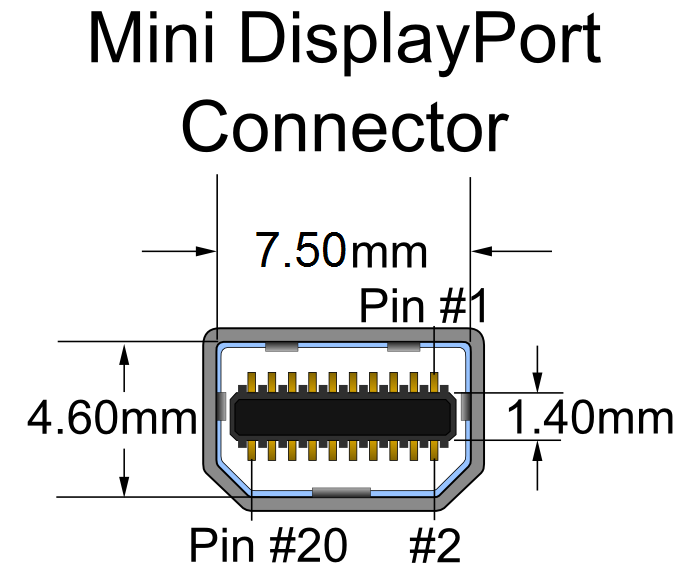 Currently I'm using three old 19 inch CRT screens with my card. The Radeon 5770 has two DVI outputs and one display port output. It also has an HDMI output but in order to use three screens you need to use the display port output. Since my old CRTs are all VGA I needed to get a few DVI converters. It was surprisingly easy because every video card I card I every motherboard I bought as come with a DVI to VGA converter. The display port is more of a problem. Display port seems to be more complicated than DVI and so converting between its VGA or DVI requires a pretty fancy converter. Even with one of these fancy converters it's not guaranteed to work. ATI has published a list of dongles that it knows work.
http://support.amd.com/us/eyefinity/Pages/eyefinity-dongles.aspx
I didn't know about that list at the time and bought an adapter by StarTech. It works in the sense that it will display a picture on third screen but it doesn't work in the sense that the picture will wobble about once a minute and every once in a while I'll have to unplug and re-plug adapter to get the video card to recognize it. It also won't drop into the special eyefinity gaming mode most of the time.
The CRTs are starting to get a bit old. No, scratch that the CRTs are very old and in desperate need of being replaced. I've been trying to find a monitor with a display port that I could buy three of. Annoyingly every manufacturer seems to be selling the exact same monitor in the exact same configurations. They are all 20 to 24 inch and come in wide screen format of 1980X1080 and 1600X900. The only exception is that there's a 24 inch screen with a resolution of 1980X1200.
I've never tried three widescreen displays. I would expect that it's probably a bit too wide. Three normal aspect ratio screens arranged horizontally work quite well because they fill in your peripheral vision. With three wide screens I suspect it would just be overkill. The only alternative is to get an older screen that doesn't have a display port on it and then get an expensive, hard to find adapter. This is what Jeff Atwood did. If I was to do this I already know which one I would get. It would probably be an UltraSharp 2007FP 20-inch. This is the kind of monitor I use at work where I have two of them. I have found them to be quite good. The high-resolution, small physical size and ability to set them up in portrait mode make them ideal for programming.
I think that most manufacturers have stopped designing new 4:3 aspect ratio monitors. They work very nicely in three monitor configurations but they also work very nicely in portrait mode too. As someone who works on long documents all the time viewing them in absolutely fantastic. Widescreen monitors used in portrait mode are, I suspect, a bit ridiculous.
Oh well, I'm going to actually go out and buy three monitors some point soon. One of my CRTs has just broken. If I leave it on too long the image would grow really large and turn purple. I've been keeping it turned off because at this point I'm scared it will catch fire or explode or something. Another monitor makes a buzzing noise whenever I display certain webpages. I'll be sure to tell you what I eventually bought and how it's worked out for me. Until then see you. Bye.
I'd like to talk to you today about computer monitors. The computer monitor is one of the most important things to consider when buying a computer. Most parts on a computer make the computer faster or able to load bigger programs but a computer screen actually goes beyond that. A computer screen actually dictates how you interact with your computer. If you have a very large screen you can see more information at the same time so there's less scrolling. If you've ever had a large, wide screen and work with spreadsheets you know how positively awesome this can be. It can also allow you to track multiple things at the same time. As a programmer I often have to have my editor, the program I'm working on and the log file that program all open at one time. Big screens let you get more work done.
With modern PCs and their modern graphics cards you can usually attach at least two monitors to your machine. Two monitors really are double the fun. What tends to happen is one of these screens becomes the main screen and the other becomes the auxiliary screen. Two screen can often be even better than 1 large screen because the two screens natural segment your workspace. You put your e-mail, tool palettes, log files, desktop widgets, Skype and all that sort of thing on a second monitor and keep the first one for working with. Two, monitors works great but you know what works better than two monitors? Three monitors.
Three monitors have recently become a real possibility thanks to the new series of ATI cards which all out you to attach three monitors. Here's the list that I know have three monitor output.
* Radeon 5670 (~$120)
* Radeon 5770 (~$180)
* Radeon 5830 (~$230)
* Radeon 5850 (~$310)
* Radeon 5870 (~$410)
I personally have the Radeon 5770. It has a respectable 3-D performance while drawing only moderate amounts of power and at a good price too. If you're only going for three monitors though you can use the cheapest since the cheapest card in a modern series will handily beat whatever graphics card you have when it comes to 3-D performance unless you're one of these guys who upgrades their video card every year.
Currently I'm using three old 19 inch CRT screens with my card. The Radeon 5770 has two DVI outputs and one display port output. It also has an HDMI output but in order to use three screens you need to use the display port output. Since my old CRTs are all VGA I needed to get a few DVI converters. It was surprisingly easy because every video card I card I every motherboard I bought as come with a DVI to VGA converter. The display port is more of a problem. Display port seems to be more complicated than DVI and so converting between its VGA or DVI requires a pretty fancy converter. Even with one of these fancy converters it's not guaranteed to work. ATI has published a list of dongles that it knows work.http://support.amd.com/us/eyefinity/Pages/eyefinity-dongles.aspx
I didn't know about that list at the time and bought an adapter by StarTech. It works in the sense that it will display a picture on third screen but it doesn't work in the sense that the picture will wobble about once a minute and every once in a while I'll have to unplug and re-plug adapter to get the video card to recognize it. It also won't drop into the special eyefinity gaming mode most of the time.
The CRTs are starting to get a bit old. No, scratch that the CRTs are very old and in desperate need of being replaced. I've been trying to find a monitor with a display port that I could buy three of. Annoyingly every manufacturer seems to be selling the exact same monitor in the exact same configurations. They are all 20 to 24 inch and come in wide screen format of 1980X1080 and 1600X900. The only exception is that there's a 24 inch screen with a resolution of 1980X1200.
I've never tried three widescreen displays. I would expect that it's probably a bit too wide. Three normal aspect ratio screens arranged horizontally work quite well because they fill in your peripheral vision. With three wide screens I suspect it would just be overkill. The only alternative is to get an older screen that doesn't have a display port on it and then get an expensive, hard to find adapter. This is what Jeff Atwood did. If I was to do this I already know which one I would get. It would probably be an UltraSharp 2007FP 20-inch. This is the kind of monitor I use at work where I have two of them. I have found them to be quite good. The high-resolution, small physical size and ability to set them up in portrait mode make them ideal for programming.
I think that most manufacturers have stopped designing new 4:3 aspect ratio monitors. They work very nicely in three monitor configurations but they also work very nicely in portrait mode too. As someone who works on long documents all the time viewing them in absolutely fantastic. Widescreen monitors used in portrait mode are, I suspect, a bit ridiculous.
Oh well, I'm going to actually go out and buy three monitors some point soon. One of my CRTs has just broken. If I leave it on too long the image would grow really large and turn purple. I've been keeping it turned off because at this point I'm scared it will catch fire or explode or something. Another monitor makes a buzzing noise whenever I display certain webpages. I'll be sure to tell you what I eventually bought and how it's worked out for me. Until then see you. Bye.
Thursday, April 15, 2010
Why you should get a high end PC - RAM
This is part 2. Part 1 is here.
RAM is good. The more RAM the better.

Windows 7 is the first consumer 64-bit OS from Microsoft that you'd actually want to run and unlike windows XP, it's not limited to 2 (ish) gigs of memory. Expect software developers to take advantage of the new memory situation by making their apps take up more memory (or should I say, "make their apps do something cool". No. No, I shouldn't.)
RAM is good. The more RAM the better.
RAM is so important that most of the time we just call it memory. There's lots of different types of memory attached to modern computers. There's hard disk, flash, buffer and cache memories to choose from. The thing is, when you just say “memory” and don't bother to qualify it, you mean RAM. That's how important it is. It doesn't even need the word “the” in front. It's implicit. That's how friggin' important it is.
The main benefits of having more memory is that allows you to use applications that manipulate huge chunks of data all at once.. Programs like this include games, photo editing applications, video editing applications and medical imaging viewers.
Generally you don't need to make the decision to buy more RAM. The applications you're using will do it for you. Essentially, one day you'll see a new, shiny application available for download that you just have to have. You'll download the application, try to run it and and suddenly realize you need more memory.

Windows 7 is the first consumer 64-bit OS from Microsoft that you'd actually want to run and unlike windows XP, it's not limited to 2 (ish) gigs of memory. Expect software developers to take advantage of the new memory situation by making their apps take up more memory (or should I say, "make their apps do something cool". No. No, I shouldn't.)
Curiously, modern operating systems don't just give up or complain when they run out of memory. Instead they will simply cram as much into memory as possible and stick the rest in the pretender-to-the-throne-memory – hard disk. In this case, you know you've run out of memory when your hard drive starts going bonkers and your PC slows down to a crawl. If you're not saving something or loading something your hard drive shouldn't be doing anything. If it is, you may need more memory.
Having more RAM than you need for the applications you run can also speed up the computer. If you have more RAM available than your computer is actually using, the machine will allocate the extra RAM to a disk cache. This is good because it means that even when you're loading something, it won't read it from the hard disk it will just use the copy already in memory. As a result, it loads incredibly fast. In my first article about storage I mentioned that before my solid state drive I used to get more RAM than I really needed. The disk cache is why. If you're too cheap to get an SSD at least max out your system memory. A run of the mill 7200RPM consumer grade hard drive will see huge gains. With a laptop's slow 4200RPM hard disk it's even more important.

(Cute girls know your laptop needs more RAM)
Note that caches work by keeping a copy of the data in memory after it's been read the first time from a hard disk. PCs often read the same things off the hard drive repeatedly due to the way programmers build their applications. The net result of this is that having a disk cache can make a surprising number of things faster.
One last thing, make sure you get your RAM from a reputable brand. Cheap, no name memory may seem like a good deal but there are quite a few bad RAM chips out there. Bad RAM can be a huge pain to diagnose since it just shows up as random crashing - which could be symptoms of almost any problem. A few good brands are Corsair, Kensington and OCZ. There are others..
So, in conclusion: RAM is good. The more RAM the better.
.. and, might I add: get more.
Next up: monitors. Why only having one is so old school.
Sunday, April 11, 2010
Why you should get a high end PC - storage
I've noticed a recent article that said that Apple has a 90% share in the computer is over a thousand dollars category. I think this is rather sad.
Another thing that useful on the higher end PC is more memory. But I'll talk about that next time.
Part 2
I don't think it's sad that Apple is doing well, this is actually quite nice. What I find sad is that people aren't buying PCs over a thousand dollars. There are some excellent reasons why you'd want a PCs over a thousand dollars.
Let's start with the hard drive. Most PCs come with a relatively small hard drive. This is silly because coming with a small hard drive means you're actually paying a lot per megabyte. It also means your PCs that run very slowly because smaller hard drives have a smaller information density which means the drive has to spin faster to achieve the same data transfer rates. Every generation there's an optimum price point for megabytes per dollar. It's not that expensive either. Last time I check this optimal point was for hard drives costing about 100$. Getting a hard drive outside this range is just throwing money away in my opinion because you always need more hard drive space.

Hard drives are otherwise my mortal enemy. Hard drives have gotten tremendously large but they haven't gotten that much faster. While the transfer rate of the drive tends to be proportional to the size of the drive the access time is proportional to the rotation rate, the speed the head can move and physical size platter size of the drive. These factors haven't really changed. The rotational speed has only gone from 4200RPM to 7200RPM but the drive size has gone from 20 MB to being 1 TB in size. That's 1 000 000 MBs! Every time the system has to retrieve a byte from the hard disk it has to wait an eternity. I hate the stupid things! I've even gone so far as to add much more RAM to my system than usual to have a huge disk cache so my machine doesn't need to access the hard disk. Have you considered a solid state drive recently?
I've recently bought an OCZ Vertex solid-state drive for use with Windows 7 on my machine and it is completely awesome. To put the speed difference in perspective consider this: good hard drives have access times of around 18 milliseconds. Good solid-state drives have an access time of about an 0.18 of a millisecond. That's a hundred times faster. Additionally, they can have transfer rates of over 200 MB a second. Hard drives have a transfer rate of 50 MB a second. In practice the performance is extremely noticeable. I'll say it again, they are super awesome.
They only downside to a solid state drive is that it doesn't hold a great deal of data for the price. My OCZ Vertex cost around 400$ and only holds 120 GB. This isn't as much of a problem as you might think though because you just have to put all your data – music, video other data, on a standard hard drive and use your SSD for windows, the swap file and most of the applications. Your system will still fly and you can store all the data you want. I recommend getting a drive slightly bigger then you think you'll need. Getting too much space is a bit embarrassing, getting too little space is a time consuming disaster.
If you've bought a netbook with a solid-state drive and haven't really been impressed by the performance we're not really talking about the same things here.
(The difference in speed amongst SSDs is huge. It's worth reading up on why that is and which drives are really worth buying.)
The technology has come along way since those early drives. The software has also been improved. Windows XP will fight with a solid-state drive but Windows 7 includes optimizations to maximize the performance you get out of the drive. This means you don't have problems like, for example, the performance of the solid-state drive degrade over time. Modern drives also don't freeze the entire computer whenever you write lots of pieces of data to them at the same time. Early and current netbooks sometimes use out of date drive controllers that still have this problem.
Another thing that useful on the higher end PC is more memory. But I'll talk about that next time.
Part 2
Thursday, April 8, 2010
Space Smilies - a technological demonstration in one lvl
In 1999 I was first introduced to Java. I quite liked it. It was the first language that I'd come across in which it was possible to write your own draw routines while simultaneously being comprehensible. Sure, I already knew C and to a lesser extent C++ but to me it had always seemed like doing anything in those languages was incredibly painful. In Java it was relatively easy. The best thing about Java, though, was its runtime and draw routines were fast enough to write a small video game in. That March break I decided to write a video game. I called it Space Smilies after the placeholder smiley face icons I was using at the time.
Ever since then I've occasionally revisited code to see if I can figure out, using my newly acquired X years of experience, why somethings never quite worked right. I also spent some time to try and take advantage of the new abilities of the latest Java virtual machine (not to mention the processor power of the newest machines). I've just completed my latest batch of fixes and enhancements and am ready to release them to the world. Let me give you a rundown of what's been enhanced recently.
First off, I've corrected all those dang threading bugs. While I understood what threads were I wrote the original application I didn't really understand all the different ways in which you can screw up using threads. Since then I've learned a great deal about threads and, in fact, have become quite familiar with them. As a result of this, the newest version of Space Smilies draws the back buffer to the component on the event thread. It used to draw back buffer to the component on the thread I was using for the game engine. This doesn't really work well because AWT and swing aren't thread safe.

I'm also using a sort of triple buffering. The game engine draws to a back buffer. This back buffer is then given to the event thread on a sort of back buffer queue. The event thread then takes the latest back buffer and draws it to the component. After drawing to the component the back buffer is put into a free pool. When the game engine needs a new back buffer for the next frame, it looks in the free pool to see if one is available. The upshot of all this is that the final blitting is done on a different thread than the game engine which is doing the compositing.
Additionally, I'm using volatile buffers wherever possible to let the video card do most of the blitting and compositing. For whatever reason I can't get bit masked volatile buffers to be accelerated. This means that the bulk of the compositing is done on the CPU although the star-field (which is the biggest blob of pixels by far) is composited all on the video card.
(This is all on windows, your millage may vary on other operating systems)
Finally, I got the resolution of the game up from postage stamp sized to 1000 x 700. The old game used to remain fixed at that resolution but the new game will scale itself to take up as much area on the screen as it can.
I'm quite interested to know whether it works for everyone. You'll need Java 6 though. With any luck you actually have that but don't know it. Try it out either way.
Ever since then I've occasionally revisited code to see if I can figure out, using my newly acquired X years of experience, why somethings never quite worked right. I also spent some time to try and take advantage of the new abilities of the latest Java virtual machine (not to mention the processor power of the newest machines). I've just completed my latest batch of fixes and enhancements and am ready to release them to the world. Let me give you a rundown of what's been enhanced recently.
First off, I've corrected all those dang threading bugs. While I understood what threads were I wrote the original application I didn't really understand all the different ways in which you can screw up using threads. Since then I've learned a great deal about threads and, in fact, have become quite familiar with them. As a result of this, the newest version of Space Smilies draws the back buffer to the component on the event thread. It used to draw back buffer to the component on the thread I was using for the game engine. This doesn't really work well because AWT and swing aren't thread safe.

I'm also using a sort of triple buffering. The game engine draws to a back buffer. This back buffer is then given to the event thread on a sort of back buffer queue. The event thread then takes the latest back buffer and draws it to the component. After drawing to the component the back buffer is put into a free pool. When the game engine needs a new back buffer for the next frame, it looks in the free pool to see if one is available. The upshot of all this is that the final blitting is done on a different thread than the game engine which is doing the compositing.
Additionally, I'm using volatile buffers wherever possible to let the video card do most of the blitting and compositing. For whatever reason I can't get bit masked volatile buffers to be accelerated. This means that the bulk of the compositing is done on the CPU although the star-field (which is the biggest blob of pixels by far) is composited all on the video card.
(This is all on windows, your millage may vary on other operating systems)
Finally, I got the resolution of the game up from postage stamp sized to 1000 x 700. The old game used to remain fixed at that resolution but the new game will scale itself to take up as much area on the screen as it can.
I'm quite interested to know whether it works for everyone. You'll need Java 6 though. With any luck you actually have that but don't know it. Try it out either way.
Monday, March 22, 2010
Is it a bug or a feature?
 If you do development for long enough large enough team you will find yourself asking this question. It matters because you need to make decisions about what gets fixed in the current release and what only gets fixed in the next release. In other words, what should be part of version 1.0.1 and what should in version 2.0. Additionally, there is also a school of thought which says that bugs should always be fixed before new features are added. Which is great, but this assumes you actually know what a bug is.
So what is a bug and how does it differ from a feature?
What is a bug depends on who you talk to. To a developer, a bug is a mistake. To tell a developer that there is a bug in their code is to tell the developer that he be screwed up. This can lead to all sorts of unfortunate confusion between end users, QA and the developer. In reality no one (except possibly the developer) actually cares whether or not it's a particular individual's a mistake. What people care about is whether or not the program is working in a way that makes sense. For example, if an application gets out of large knife and stabs the user in the eye when they select "Copy" from the "Edit" menu it doesn't really matter if the developer intentionally programmed it to do that. What matters is the behavior is undesirable. Well, I presume the behavior is undesirable. You might actually be trying to create an application that stabs the user in the eye whenever they select Copy from the Edit menu. I don't presume to know what crazy project you're actually working on.
 QA, for instance, will tend to think of any stupid behavior as a bug. For example, let's say that QA files a bug that the font sizes too small to be readable. The developer takes a look at what font size should be, double checks to see that he's using the right size and then simply claim that it's not a bug. Presumably he then goes on to stab QA in the eye.
Sale and marketing are even more out there. They have no idea how anything actually works and as a result can consider six man years worth of work to be a bug. For example, if the email client you're building doesn't do SMTP autentication then that's a bug. It's a bug because it doesn't work with this particular SMTP server. I mean come on! What were you thinking?
At Intelerad, we've gotten fed up with discussions on whether something is a bug or a feature and started thinking about everything as change requests. Once you're looking at everything as a bunch of change requests you can start focusing on the things that actually matter about those change requests and use that criteria to make decisions.
What are we trying to encapsulate when we ask if something is a bug or feature? It may matter because you made a policy that says that bugs can get fixed on existing branches or releases would features will always be fixed along the trunk. Okay, but why did you make the decision that only bugs get fixed along batches? Did you make the assumption that bugs would simply be things that were easy and quick to fix? If that's the case then why don't you say that only change requests that are easy and quick to fix get fixed along branches. Did you make the assumption that bugs would be severe; that they would stop the user from being able to use some feature of the application? If that's the case then why don't you say that only change requests that affect critical functionality will get fixed along branches. Did you make the assumption that feature work would be too destabilizing along the stable branch? If that's the case then why don't you say that only change requests that are not destabilizing will get fixed along branches. Don't say that he will only fix bugs be precise about which aspects of the change requests will allow you to fix an issue along an existing branch.
Here are the things we typically consider:
How bad is the problem?
Would the fix destabilize the old version?
How long does it take to fix?
The first two questions are the most important. The last question is more
 of a sanity check. If the answer to the last question is anything more than about a day, then you're probably lying to yourself about it not destabilizing anything. It should also go on the trunk because it represents significant development.
I'm making the assumption that you've already discovered that you should be working along the trunk by default. Ideally you shouldn't be back porting anything. You should be releasing major versions often enough that your clients (or users) can wait until the next major version. If they can't wait until the next version you're not releasing often enough. That's pretty much a golden rule. The length of your release cycles should be matched with the expectations and demands of your client base.
Subscribe to:
Posts (Atom)

 Posts
Posts